Posted on: Feb 09, 2026 | Author: Admin
3 min Read
Virtual Try-On Solutions: A Game Changer for Online Shoppers and Ecommerce Brands
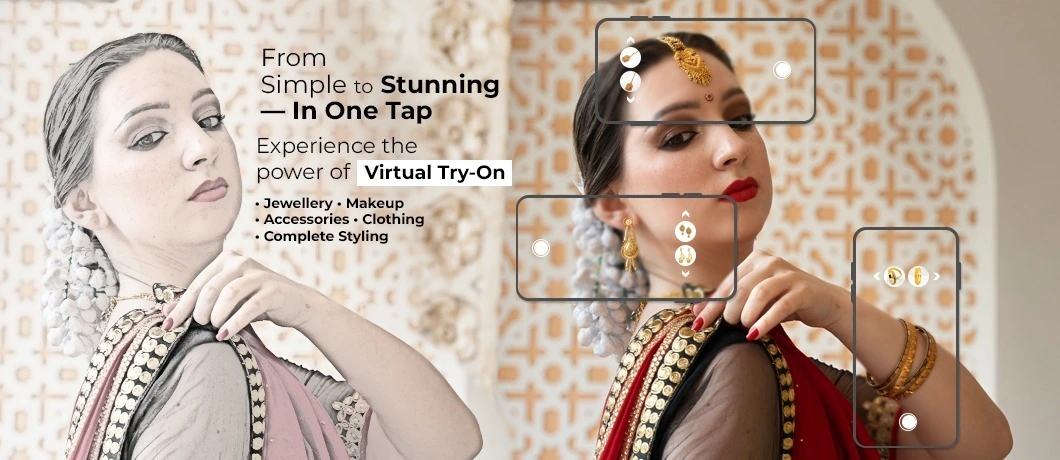
The shopping experience had one important advantage when you were shopping in a physical store: you could check what it looked like before you bought it. The internet shopping changed this. It brought convenience to shoppers but took away certainty.
This is precisely the place where virtual try-on solutions can be found. Customers can try out products with their eyes or body by using a camera image or even an avatar-like view so that the buyer is confident before the purchase. A lot of "complete tutorial" sites define Virtual try-on technology in these words and are correct.
However, if you're a company or product team, the main problem isn't "What does it mean?" It's:
- What kind of trial are we looking for?
- What needs to be constructed in the background?
- How do we assess the quality of our products quickly?
- How do we send it without slowing down the website?
Let's dive into it.
What is Virtual Try-On Technology?
Virtual trial is a type of virtual product experience that lets customers view the way a garment would look on them after they purchase it, in most cases, using a mobile or laptop camera. It is a regular business of eyewear, makeup, shoes, jewellery, and clothes powered by Virtual try-on technology.
These experiences can coexist with wider augmented reality and virtual reality applications that are deployed in ecommerce and retail platforms, in particular, where product discovery is a key focus.
Virtual try-on solutions can be discussed as a generic term; however, it has numerous different examples that can be united under this label:
- Face test-on (makeup glasses, shades, sunglasses, glasses)
- AR virtual test of footwear (sneakers, sandals)
- Body test-on (jackets and dresses, tops)
- Fitting tools that focus on sizing (less on visuals, but more about "What do I need to purchase? ”)
How Virtual Try-On Works (without the fluff)
Most implementations of virtual trial services combine four building blocks.
1) Input: camera or photo
The experience begins with one of two things:
- ✓ a live camera view or
- ✓ A still image that the retailer uploads
A live camera is much more "real," but it's difficult to use smoothly on devices with lower specs.
2) Tracking: mapping the shopper (face, foot, body)
The system recognises landmarks like lips and eyes to enhance beauty or the foot outline for shoes. It then ensures that the product is aligned when the user is moving.
Quality comes out quickly. If alignment gets off-track, shoppers are unable to trust you in a matter of moments.
3) Asset layer: 2D, 3D, or hybrid product models
The product appears to be:
- ✓ 2D overlay (fast; however, it has very limited real-world realism).
- ✓ 3D model (more realistic, better work)
- ✓ Hybrid (common for beauty: Shade and texture simulation on live face)
This is also the place where product visualisation technology and 3D visualisation of products are actually real and not mere buzzwords within advanced virtual try-on solutions.
4) Rendering: lighting, realism, and performance
To appear credible, a system needs to deal with:
- ✓ lighting differences (warm room vs daylight),
- ✓ Occlusion (product appearing behind the hairline or behind the edge of the face)
- ✓ skin tone and texture for the cosmetics.
If it appears fake, it's more than just a "visual" issue. It's a trust issue.
Benefits of Virtual Try-on Solutions (what teams actually care about)
-
Enhance buyer confidence :
Shoppers can stop the process of guessing. This decreases second-guessing and hesitation when you check out. -
Fewer "wrong option" returns :
This is an important issue in beauty and fashion in which fitting and shade mismatch drive returns. A lot of these tools draw on the logic of Real-time face tracking, which ensures that the accuracy of previews can reduce regrets after making a decision. -
Better product discovery :
Try Out turns browsing into interaction. More people test different options when it's simple with Ecommerce virtual try-on. -
More useful product pages :
An effective experience of trial and error can make the PDP more than just a display of images. It is a tool for making decisions. -
Sharing moments (when done correctly) :
Certain categories gain traction when people can save a look to give it away, especially for fashion and eyewear.
Virtual Try On Examples (and what makes them work)
Virtual Trial for Beauty (lipstick, foundation, eye looks)
What works:
- ✓ “Good enough" Realism quickly, and not a slow pace of perfection.
- ✓ Clear shade naming
- ✓ One-tap comparison (shade A Vs shade B)
- ✓ A fallback option when lighting is not ideal (prompt to change to higher brightness)
Eyewear Virtual try-on
What works:
- ✓ exact scale and precise placement
- ✓ simple head turn direction
- ✓ quick loading
- ✓ A simple snapshot to compare
Virtual try-on for Footwear
What works:
- ✓ Stable foot tracking
- ✓ Clean background guidance to ensure the camera will be able to lock onto the foot
- ✓ 3D model that has a realistic material response
Camera-based try-on vs sizing tools. The art of designing clothing is a challenge. A lot of teams achieve better results when they start with the tools to gauge size (virtual fitting rooms) before layering on more upscale images later on.
How to Choose a Virtual Try-On Solution
1) Start with the category
Fashion, eyewear, shoes, clothing, and eyewear are all different in their requirements. Select one of the categories first.
2) Decide what “success” means
Examples of quantifiable outcomes:
- ✓ Rate of use during trial (sessions which begin the AI-powered try-on)
- ✓ add-to-cart rate after AR virtual try-on
- ✓ Return rate changes for trial users. The time it takes to make a choice (Is trying to cut down on the time to decide?)
If you are using numbers in your article, be sure to make them examples or citations to your own statistics.
3) Ask what the solution needs from you
Standard requirements:
- ✓ Images of products or 3D assets
- ✓ shade data (beauty)
- ✓ Charts of sizing and measurements for garments (apparel)
- ✓ SKU plan of coverage (start with the top-selling items)
4) Test for realism and stability, not just “wow”
During vendor demos, look for:
- ✓ alignment drift
- ✓ The load speed of devices on average
- ✓ behaviour in dim lighting.
- ✓ What is the reason why the experience doesn't work (does it get better?)
5) Confirm device support and performance
This may sound boring until you see the bounce rate. Smooth and device-agnostic UX is frequently mentioned as a key success element.
Where This is Going Next: Metaverse Shopping and Immersive Ecommerce Solutions
When 3D-enabled viewers, virtual try-on, camera-based try-on, and richer product pages become standard, an ecommerce store stops being just a product list and starts feeling interactive. Many market reports point to 3D try-on and immersive commerce as the next step.
The same shift across other industries also occurs, like Extended Reality (XR) in real estate , which allows people to visualise the property and make decisions more quickly. The same pattern of behaviour is being reflected in the way we shop online. This helps people to look at their dream property without actually visiting, which saves their expense.
That is why virtual try-on is often linked with metaverse development and immersive commerce models. For VYUG Metaverse , this works as a practical bridge: a direct, revenue-focused move toward immersive shopping without building a full metaverse store on day one.
FAQ About Virtual Try On
Was this helpful?

Leave a Reply
Your email address will not be published. Required fields are marked *
User Comments
Related Articles
Virtual Reality Game Development: Th...


Virtual Reality (VR) in Real Estate:...
Virtual Sustainable Living: Alternat...
Newsletter Sign-up
